FESCO Bill Check Online – View & Download Duplicate Bill
A FESCO bill is retrieved using the 14-digit reference number or 10-digit consumer ID printed on any earlier bill from the same connection. Entering either one opens your current bill on the official PITC billing system, where the amount, due date and units are shown. No registration, no fee, and it works on a phone.
Online FESCO Bill Check
Enter your Reference Number or Consumer ID to open your latest official FESCO bill.
Official PITC data- The 14-digit Reference Number sits in the top-left block of any previous FESCO bill.
- The 10-digit Consumer ID is printed in the same block — either one works here.
- Type digits only. Spaces are added automatically as you go.
🎓 The Punjab Boards 11th Class Result 2026 is just around the corner! Are you ready? 📚✨ Hard work matters, but don’t forget to pray for the best results and seek blessings from Allah. 🤲❤️
💪 Your 11th class builds the foundation for your future! A strong academic foundation can help you in your 2nd year, higher studies, job interviews, and many more opportunities. 🌟🍀
Watch: How to check your FESCO bill online (20 sec)
How to check your FESCO bill online
The tool above checks that your number is the right length, then opens your bill on the official PITC portal in a new tab. Nothing is displayed on this page — the bill you see is the one Faisalabad Electric Supply Company’s own billing system holds.
Using your 14-digit reference number
- The Reference No tab is already selected when the page loads.
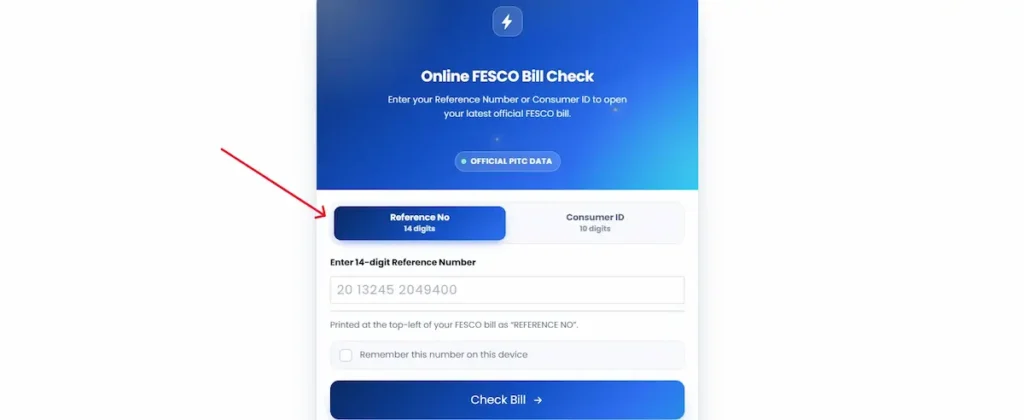
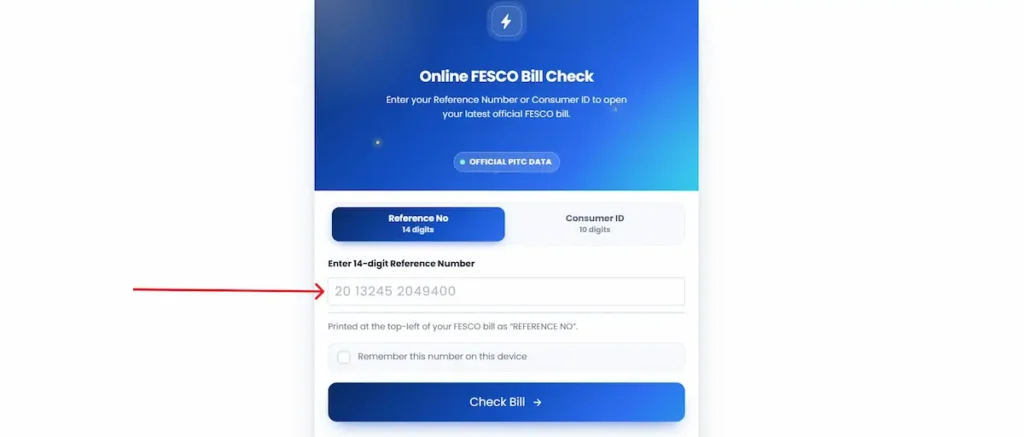
- Type all 14 digits into the field. No spaces, no dashes, no letters.
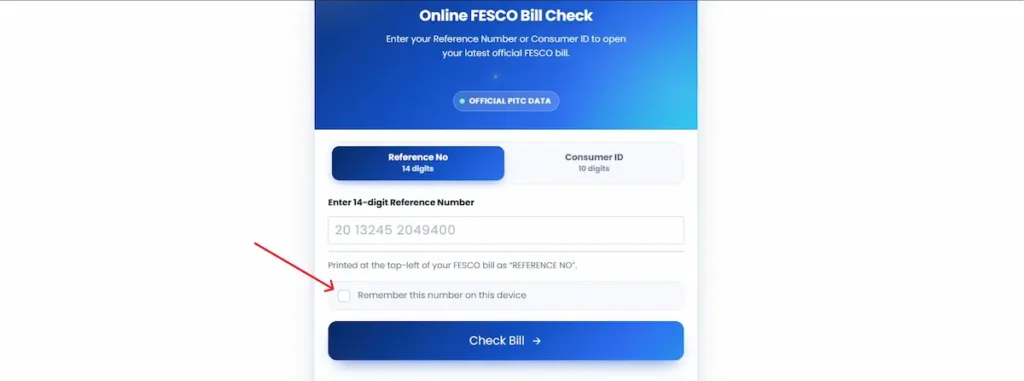
- Tick Remember this number on this device if you want it filled in for you next month.
- Press Check Bill.
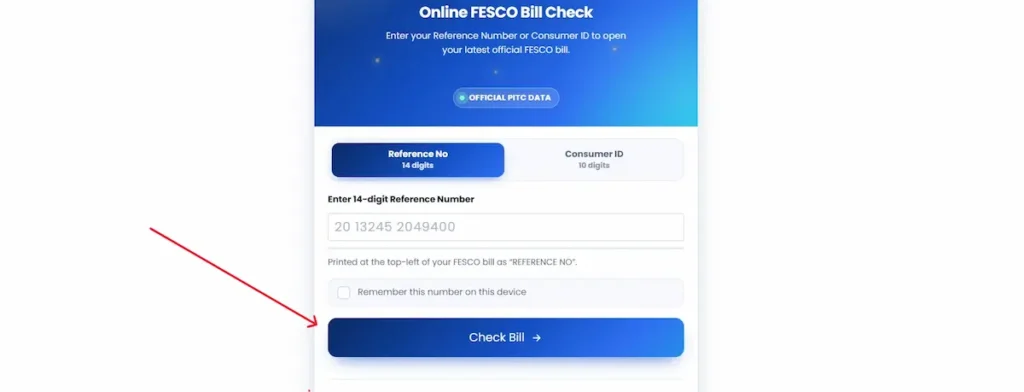
- The official PITC page opens in a new tab with your bill amount, due date, units consumed, meter reading dates and the last 12 months of billing history.
Two things cause the number to be rejected. One is a miscount — 13 or 15 digits instead of 14. The other is a pasted number carrying a space or line break from wherever you copied it. Retype it by hand if the paste fails.
Using your 10-digit consumer ID
Tap the Consumer ID tab before typing, or the field will expect 14 digits and reject a 10-digit entry.
The consumer ID is printed in the same box as the reference number, just below it. This tab exists because the two numbers do not always travel together: some older printed bills show one more clearly than the other, and a saved bank or wallet payment record may store only the consumer ID.
Checking on a mobile phone
The field is set to numeric input, so your phone opens the keypad rather than the full keyboard. After you press Check Bill, the PITC page opens in a new browser tab — not in an app. The bill loads as a page you can pinch to zoom; the reference number and amount sit at the top. Your browser’s back button returns you here.
If you ticked Remember, next month is one tap: open this page, and press Check Bill.
Where to find your reference number on a FESCO bill
Your reference number appears twice on a FESCO bill. It is printed in the CONSUMER DETAIL box at the top left, under the heading REFERENCE NO, and again in the payment block at the foot of the page beside the barcode. Either copy works, so a payment slip kept from an earlier month still opens the bill.
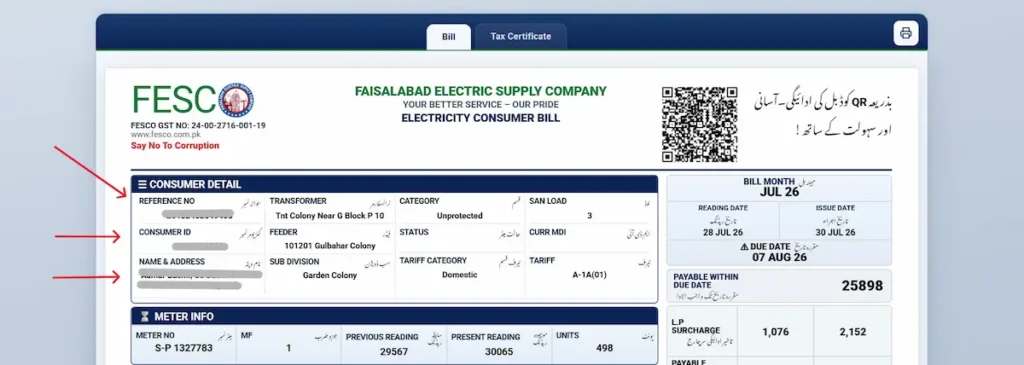
It is 14 digits with no letters. On the sample above it reads 20132452049400, and the barcode line prints the same number spaced as 20 13245 2049400.
Three numbers on the bill get mistaken for each other:
- Reference number — 14 digits, labelled REFERENCE NO. Top-left box, and again at the foot of the page. This is the one the checker needs.
- Consumer ID — 10 digits. In the top box it sits directly below the reference number. In the payment block at the foot it sits directly above it.
- Meter number — in the METER INFO box and stamped on the meter itself. It starts with letters, and no bill can be opened with it.
The reference number belongs to the connection, not to the month. It stays the same in every billing cycle and does not change when a duplicate is issued, so any older bill for the same premises will do — including one left behind by a previous tenant or owner.
What the rest of the consumer detail box tells you
The same box carries the details that matter when something goes wrong.
SUB DIVISION names the office that handles your connection. Meter faults, reading disputes and billing complaints all start there. FEEDER and TRANSFORMER identify the supply line you sit on, which is what an outage complaint is logged against.
CATEGORY shows Protected or Unprotected, and that decides which slab rates you are billed at. TARIFF CATEGORY and TARIFF give the connection type, where A-1A(01) is a standard domestic supply. SAN LOAD is your sanctioned load in kilowatts, and the fixed charges on your bill are worked out from it.
Reading these out along with your reference number when you call 118 gets the case to the right office faster.
Can you check a FESCO bill by CNIC?
No. A FESCO bill cannot be retrieved by CNIC, name, address or meter number. The billing system indexes every connection on the reference number and consumer ID, so one of those two numbers is required. If you no longer have a bill in the house, five routes will get the number back.
- 1. Your payment history. If you have ever paid through JazzCash, EasyPaisa or a bank app, the reference number is stored in that transaction record. Open the app, find the electricity payment, and the number is printed alongside it. This is the quickest route by a wide margin, and most people forget they already have it.
- 2. Any older bill for the same premises. The reference number belongs to the connection, not to the month. A bill from any past cycle works, including one left behind by a previous tenant or owner.
- 3. Register your CNIC at mnr.pitc.com.pk. This links your CNIC and mobile number to the connection and is the permanent fix. Once registered, your bill details reach you by SMS each month and you stop depending on the printed copy arriving.
- 4. The 8118 SMS service. After registration, send your reference number to 8118 to receive bill details on your phone.
- 5. Your sub-division office. Staff can trace a connection from the CNIC and address on record. Carry your original CNIC and a document tying you to the property — ownership papers, a tenancy agreement, or an older bill in the previous owner’s name. Without one, the trip is usually wasted.
Why your bill shows “Bill Not Found”
The message means the number entered did not match a connection. Five causes account for nearly all of it.
A miscounted digit. The reference number is 14 digits. Entering 13 or 15 returns nothing. Count them before pressing Check Bill.
A space or dash from a paste. Copying the number from a message or a saved note often carries an invisible space or line break. Retype it by hand.
A new connection. A meter installed part-way through a cycle has no bill until the first full billing period closes.
The current bill has not been generated. FESCO bills on a staggered sub-division schedule, so households a street apart receive bills on different dates. If your neighbour has theirs and you do not, wait a few days and try again.
The portal is under load. The PITC system slows when traffic is heavy, usually in the evening and around due dates. This is server load, nothing to do with your number. Trying again later, or early in the morning, generally works.
How to download or print your duplicate FESCO bill
Once your bill opens on the PITC page, the download and print controls are your browser’s own — the bill is on that page, not on this one.
- On Android (Chrome): menu → Share → Print → set Destination to Save as PDF → Save.
- On iPhone (Safari): Share → Options → select PDF → Save to Files.
- On a computer: press Ctrl+P (or Cmd+P on Mac) and either print directly or choose Save as PDF.
Most people checking on a phone do not realise the browser can produce a PDF at all, so they screenshot the bill instead. A PDF is cleaner, keeps the full page, and prints properly at a shop.
A printed duplicate is accepted at bank counters, post offices, and retail payment agents. It carries the same reference number, amount and due date as the copy delivered to your door, because it is drawn from the same record — not a separate or unofficial document. Nothing on it is generated by this site.
How to check whether your FESCO bill is paid
Open your bill through the checker above. Once a payment has been posted, the bill shows a paid mark with the date it was recorded. The payment history table on the same page also lists what was paid against each of the last 12 months.
The part that causes most confusion is timing. A payment does not appear the moment you make it. It usually takes 24 to 48 hours to reflect, and a payment made on Friday, Saturday or Sunday can take longer, because bank settlement does not run over the weekend. A bill still showing as unpaid on Sunday evening after a Friday payment is normal.
Keep your transaction ID or a screenshot of the receipt until the status changes. If a payment is ever queried, that record is what settles it — and it is what stops you paying twice out of doubt.
Viewing previous months and old FESCO bills
Your current bill contains a 12-month history table listing the billing month, units consumed, amount billed and amount paid for each cycle. For checking consumption trends, comparing last summer against this one, or confirming which months were paid, that table holds what you need and it is available online right now.
What the portal does not serve is a full printable bill for a past month. It carries the current cycle. Sites promising downloadable bills from a year ago are describing the history table, not separate documents.
If you need proof of past billing for a rental dispute, a property transfer, an ownership change or a tax record, the sub-division office can issue a written statement of the account. Take your CNIC, the reference number, and a document connecting you to the property. Ask for a billing statement covering the specific months you need, and state what it is for — the office issues these routinely, but the request has to name a period.
What each charge on your FESCO bill means
Your total is built from energy consumed plus a set of fixed charges, adjustments and government levies. Rates are set by NEPRA and notified by the federal government, and they change — the amounts printed on your own bill are always the current ones.
Energy charges
The units you consumed multiplied by the rate for your tariff category and slab. This is the largest line on most domestic bills and the only one you directly control.
Fixed charges
A monthly amount tied to your sanctioned load in kilowatts, payable regardless of how much you use. Domestic fixed charges were restructured under the 2026 tariff reform, which moved household connections to a two-part tariff combining a fixed and a variable component. Our FESCO bill calculator works the amount out from your sanctioned load.
FPA (Fuel Price Adjustment)
Set monthly by NEPRA against the actual fuel cost of generation, and applied to your bill roughly two to three months later. That lag is why a bill can rise sharply in a month when your consumption did not change at all. It can be positive or negative.
FC Surcharge
A flat per-unit charge — Rs 0.43 at the rate in general application — collected to service the debt held by Power Holding Private Limited. Lifeline consumers are exempt.
Quarterly Tariff Adjustment (QTA)
Is calculated quarterly and billed over the recovery period specified in the applicable notification and covers the difference between the tariff NEPRA determined and what was actually recovered over the preceding quarter.
TR Surcharge
The gap between the NEPRA-determined tariff and the rate the government notifies. Where the notified rate is lower, government meets the difference as subsidy; where it is higher, the amount is recovered from distribution companies as the Inter-DISCO Tariff Rationalisation surcharge.
GST
General Sales Tax at 18%, applied to the bill. Lifeline consumers are exempt.
Electricity Duty
A provincial levy collected by FESCO on behalf of the Punjab government, calculated as a percentage of the electricity charges. It is not a federal tax.
PTV licence fee
A fixed monthly amount collected on behalf of Pakistan Television. It does not vary with consumption.
Income tax deduction
Deducted on bills above a set bill-amount threshold, at different rates for tax filers and non-filers. If you file a return, this is adjustable against your annual tax liability — money most consumers never claim back. Unregistered commercial connections may also see Further Tax and Extra Tax.
Meter rent, arrears and deferred amount
Meter rent applies to certain connection types. Arrears is an unpaid balance carried forward and does attract a late payment surcharge. A deferred amount is a portion the utility has allowed you to postpone; it carries no late surcharge and rolls into your next bill.
Late payment surcharge
Added if payment is made after the due date. The figure is printed on your bill as the amount payable after the due date, so the cost of delay is visible before you decide to wait.
Protected and non-protected consumers
This is the single most consequential classification on a domestic bill, and it is where most unexplained bill shocks come from.
A connection is protected when consumption has stayed at or below 200 units in every one of the preceding six billing cycles. Protected consumers are billed at subsidised slab rates.
Cross 200 units in a single month and the connection becomes non-protected — and here is the part that catches people out. The higher rate is applied to your entire consumption, not just to the units above 200.
Consider two neighbouring months. At 190 units, all 190 are billed at protected rates. At 210 units, all 210 are billed at non-protected rates. Twenty extra units do not add twenty units’ worth of cost; they re-price the whole bill. The difference typically runs into thousands of rupees.
Regaining protected status is not immediate either. Because the test looks back across six billing cycles, a single month above 200 units keeps a connection non-protected until six consecutive months at or below the threshold have passed.
The practical lesson is to know where your household normally sits. If your usual consumption is in the 170 to 195 range, you are close to the edge, and one hot month, one visiting family, or one new appliance can push you over. Air conditioners, water pumps and electric heaters move a bill by tens of units per day. Non-TOU households with a single-phase connection, sanctioned load up to 1 kW, and consumption no higher than 100 units in the current month and each of the preceding twelve months fall under lifeline rates and are treated separately again.
Your last six months of consumption are printed on your current bill in the history table. Check them before assuming your rate is safe.
How to pay your FESCO bill
Payment is made against your reference number, whichever route you use. The bill itself is not needed for a digital payment — only the number and the amount.
Mobile wallets and bank apps
The path is much the same in every app: Bills → Electricity → FESCO → enter your reference number. The app then pulls the outstanding amount from the billing system and displays it for confirmation.
JazzCash, EasyPaisa, UPaisa and NayaPay all support FESCO, as do the apps of HBL, UBL, MCB, Meezan Bank, Allied Bank and Bank Alfalah.
Before you confirm, check that the amount shown in the app matches the amount on your bill. If the app shows a higher figure, you are most likely past the due date and looking at the surcharged amount. If it shows an older balance, your latest bill may not have posted yet.
Save the receipt or transaction ID. It is the only proof you hold until the payment appears against the bill.
Paying in person
Designated bank branches, post offices and authorised retail agents accept counter payments. Take the printed bill or the payment slip torn from it; agents can also accept the reference number alone, though a printed copy is faster.
Always collect the stamped receipt before leaving the counter.
Pay before the due date and you pay the lower of the two figures on your bill. The higher figure — printed as the amount payable after the due date — already includes the late payment surcharge. The cost of waiting is set out on the bill in advance, so you can see exactly what a few days will cost you.
FESCO peak hours and how they affect your bill
Peak hours shift with the season, moving later as the evenings get longer. They generally fall around 5pm to 9pm in the winter months, 6pm to 10pm in spring and autumn, and 7pm to 11pm at the height of summer.
What those hours mean for your bill depends on your meter.
On a standard single-rate domestic meter, every unit costs the same whatever time you use it. Shifting the washing machine or the water pump to the morning does not change your rate — reducing appliance running time or power consumption lowers your total consumption for the month, which is what keeps a household below the 200-unit protected threshold.
On a TOU or TOD meter, peak and off-peak units are billed at separate rates, and the timing itself changes what you pay. These meters are standard on commercial and industrial connections and are fitted to some domestic ones. If your bill shows peak and off-peak unit columns, you have one.
FESCO complaint and helpline numbers
| Purpose | Contact |
|---|---|
| Complaints, outages, emergencies (24/7) | 118 |
| SMS service — send your reference number | 8118 |
| Toll-free UAN | 0800-66554 |
| Faisalabad landline | 041-9220184 |
| customercare@fesco.com.pk |
Have your 14-digit reference number ready before you call. Every complaint is logged against the connection, and the number is the first thing you will be asked for.
What happens after you complain
A complaint lodged by call or SMS is entered into CCMS, the complaint management system PITC operates for all distribution companies, and generates a DMR or complaint ID. Write it down. Without it, a follow-up call starts from nothing and the case has to be traced by hand.
If the complaint is not resolved, there is a defined route upward. Your sub-division office (SDO) handles meter faults, reading disputes and local supply problems, and is where almost every case should begin. Unresolved matters move to the division (XEN), then to the circle (SE).
For a disputed bill specifically, the sequence matters: raise it with the sub-division first and get the complaint ID, then escalate to the XEN in writing with that ID attached. If it remains unsettled after the utility’s own process, the dispute can be taken to NEPRA, which handles consumer complaints against distribution companies.
Areas covered by FESCO
FESCO supplies electricity across eight districts of central Punjab: Faisalabad, Chiniot, Jhang, Toba Tek Singh, Sargodha, Khushab, Mianwali and Bhakkar.
The network is organised into six operation circles — Faisalabad-1, Faisalabad-2, Jhang, Sargodha, Mianwali and Toba Tek Singh. The last of these was created in 2023 by splitting the Jhang Circle, which had grown too large to serve well. Under the circles sit around 26 operation divisions and roughly 140 sub-divisions, and it is the sub-division that handles your meter, your reading and your complaints.
| District | Main towns and tehsils |
|---|---|
| Faisalabad | Faisalabad City, Faisalabad Sadar, Jaranwala, Samundri, Tandlianwala, Chak Jhumra |
| Chiniot | Chiniot, Bhowana, Lalian |
| Jhang | Jhang, Shorkot, Ahmadpur Sial, Athara Hazari |
| Toba Tek Singh | Toba Tek Singh, Gojra, Kamalia, Pir Mahal |
| Sargodha | Sargodha, Bhalwal, Bhera, Kot Momin, Sahiwal, Shahpur, Sillanwali |
| Khushab | Jauharabad, Khushab, Noorpur Thal, Quaidabad, Hadali, Mitha Tiwana |
| Mianwali | Mianwali, Isakhel, Piplan, Kundian |
| Bhakkar | Bhakkar, Darya Khan, Kallur Kot, Mankera |
About FESCO
Faisalabad Electric Supply Company was established in 1998 and supplies more than five million consumers across eight districts of central Punjab.
FESCO is a distribution company. It does not generate or transmit electricity. Generation sits with independent power producers and GENCOs, transmission with NTDC, and power is purchased centrally through CPPA-G. Tariffs are determined by NEPRA and notified by the federal government. Billing and complaint systems are run by PITC.
FESCO was formed out of WAPDA, which is why older consumers still refer to the electricity bill as the WAPDA bill.
Frequently asked questions
Can I check a FESCO bill without a reference number?
Only with the 10-digit consumer ID. There is no lookup by CNIC, name, address or meter number. Recovering the reference number from an old bill or a payment record is the practical route.
Is there any charge for checking a bill online?
No. Viewing, downloading and printing a duplicate bill is free. Any site asking for payment or account registration to show your bill should be avoided.
Why is my bill higher this month when my usage did not change?
Usually the Fuel Price Adjustment, which is calculated monthly and applied two to three months later. A quarterly adjustment or a change in slab can also do it. Compare the units column, not the total.
How many grace days are allowed after the due date?
None on the amount. After the due date, the higher figure printed on your bill applies. Disconnection follows continued non-payment rather than a single missed date.
What is the difference between the reference number and the consumer ID?
Both identify the same connection. The reference number is 14 digits and used for almost everything; the consumer ID is 10 digits, printed in the same block, and works as an alternative lookup.
Can I get a bill by SMS every month?
Yes. Register your CNIC and mobile number against the connection at mnr.pitc.com.pk, after which bill details are sent to your phone each cycle.
What should I do if my meter reading looks wrong?
Photograph the meter showing the current reading, then report it to your sub-division office with your reference number. Quote the reading on the bill and the reading on the meter.
Can I change the name on a FESCO connection?
Yes, through the sub-division office. It requires proof of ownership or transfer, your CNIC, and a cleared bill with no arrears outstanding on the connection.
Does the WAPDA bill mean the same as the FESCO bill?
Yes. FESCO was formed out of WAPDA in 1998 and now bills the Faisalabad region directly. The habit of calling it a WAPDA bill remains, but the bill is a FESCO bill.
Is this the official FESCO website?
No. This is an independent bill checker that opens your bill on the official PITC billing portal. FESCO’s own website is fesco.com.pk.